

Here is a step-by-step guide on how to make a deposit via PayWallet
- Go to the Deposit page and select Internet Banking > PayWallet.
- Enter your desired Deposit Amount.
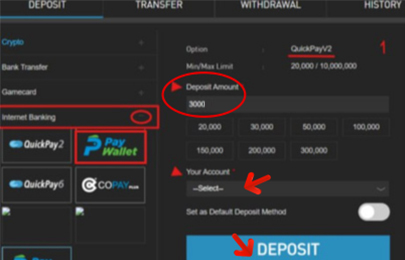
- Select the Bank Account you want to use, then click Deposit.
- A new PayWallet payment pop-up will appear.
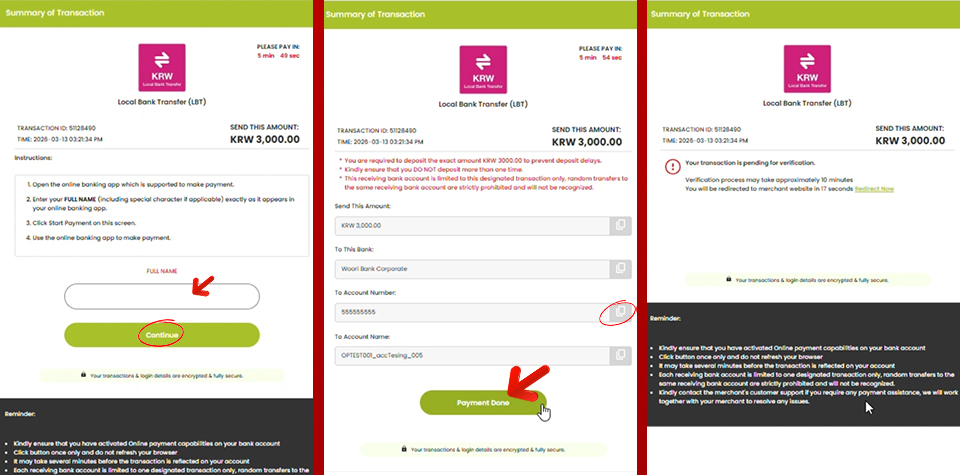
- Enter your full name exactly as shown on your bank account/book, then click Continue.
- Copy the bank account number shown on the payment page and transfer the exact requested amount to that account.
- After completing the transfer, click Payment Done at the PayWallet page to confirm your payment (this step is important)
- You can check your transaction status on the PayWallet page.
Important Notes
- Always transfer the exact requested amount.
- Only transfer funds to the bank account shown on the current payment page.
- Do not transfer funds to any old or previously used deposit account.
- Always click Payment Done after completing your transfer.
PayWallet Guide Video
Need Help?
Having trouble making a deposit? Our W88 Customer Support Team is here to help. Contact us through the official W88 website or Live Chat for fast assistance with your account or deposit.
Contact Us :
LiveChat : W88 Malaysia
Telegram: W88Malaysia