
Winning at W88 is always exciting, and withdrawing your winnings should be just as simple. If you’re using the latest W88 mobile platform and are unsure where to find the withdrawal option, this guide will walk you through the entire process.
Whether you’re making your first withdrawal or returning after the platform update, follow the steps below to complete your transaction safely and quickly.
How to Withdraw Your Winnings on W88 Mobile
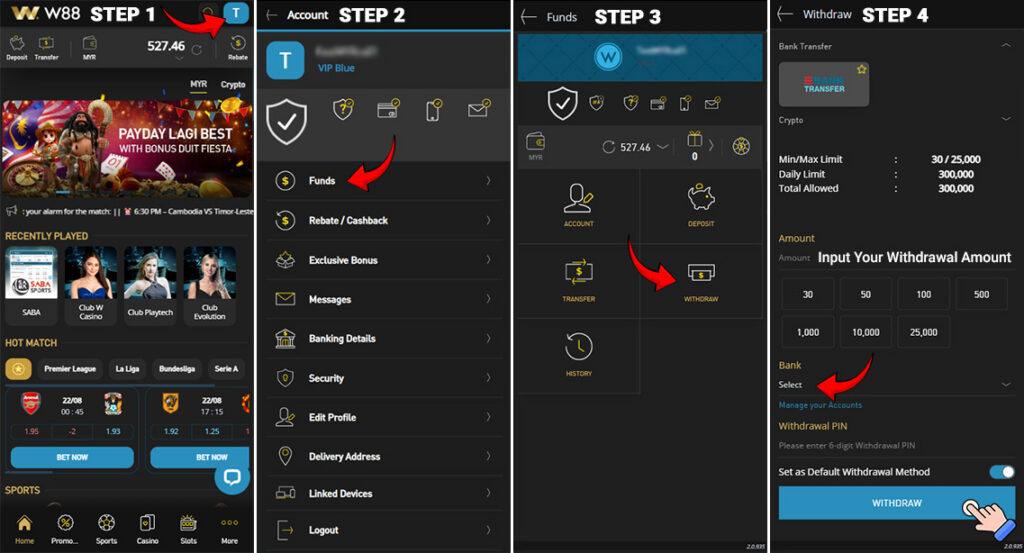
Step 1: Open Your Account Profile
Log in to your W88 account using your mobile device. On the homepage, tap the blue profile icon located in the upper-right corner of the screen.
Step 2: Go to the Funds Menu
After opening your profile, you’ll see several account options. Tap Funds to access your deposit and withdrawal features.
Step 3: Select “Withdraw”
Inside the Funds section, tap Withdraw to open the withdrawal page.
Step 4: Complete Your Withdrawal Details
On the withdrawal page, you’ll need to enter the following information:
- Your withdrawal amount
- Your preferred bank account or bank transfer option
- Your 6-digit Withdrawal PIN
Before submitting your request, double-check that all the information is correct. Once everything has been completed, tap the Withdraw button.
Step 5: Wait for Processing
Your withdrawal request will be submitted for processing. Processing times may vary depending on your selected payment method and bank. Once approved, your winnings will be transferred to your registered bank account.
How to Create or Change Your W88 Withdrawal PIN
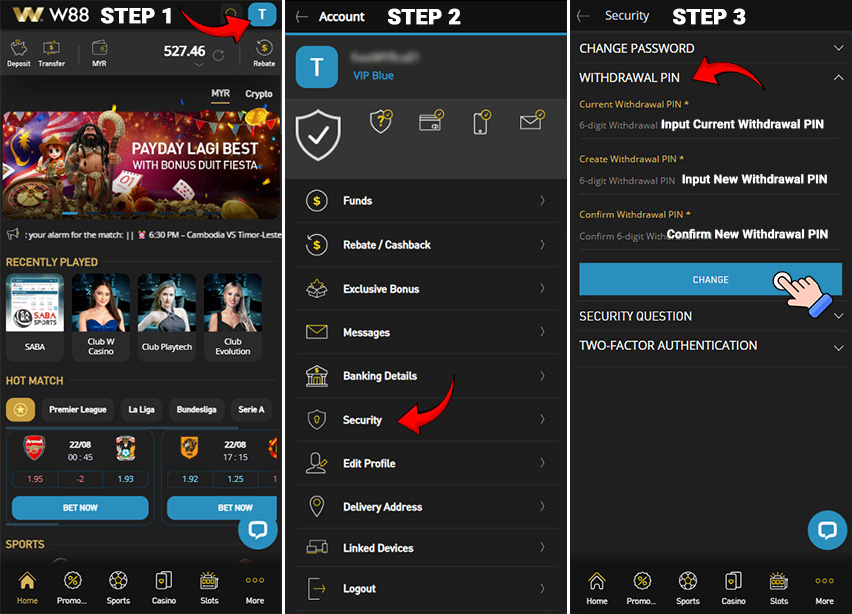
A Withdrawal PIN provides an extra layer of security by protecting your withdrawal requests. Before you can withdraw your funds, you’ll need to create a Withdrawal PIN if you haven’t already done so.
Create a New Withdrawal PIN
- Step 1: From the W88 homepage, tap the blue profile icon in the top-right corner.
- Step 2: Select Security from the account menu.
- Step 3: Tap Withdrawal PIN.
- Step 4:
If this is your first time setting up a Withdrawal PIN: - Enter a new 6-digit PIN in the Create Withdrawal PIN field.
- Re-enter the same PIN in the Confirm Withdrawal PIN field.
- Tap Create to save your PIN.
Your Withdrawal PIN is now ready to use whenever you submit a withdrawal request.
Change Your Existing Withdrawal PIN
If you’d like to update your current Withdrawal PIN, follow these steps:
- Enter your current 6-digit Withdrawal PIN.
- Enter your new 6-digit PIN in the Create Withdrawal PIN field.
- Enter the same new PIN again in the Confirm Withdrawal PIN field.
- Tap Change to update your Withdrawal PIN.
For your account’s security, avoid using easy-to-guess PINs such as birthdays or repeated numbers, and never share your PIN with anyone.
Need Help?
If you experience any issues while creating your Withdrawal PIN or withdrawing your winnings, the W88 Customer Service team is available to assist you. Contact Customer Support through the official W88 website or Live Chat for fast assistance with your account and withdrawal requests.
Contact Us :
LiveChat : W88 Malaysia
Telegram: W88Malaysia